

What is Node-Red®?
1 Scripts in Ingenuity 7
Section titled “1 Scripts in Ingenuity 7”Eigen Ingenuity 7 leverages Node-RED®, an open-source flow-based programming tool, to enhance its dashboards and features. Node-RED® provides a web-based graphical interface for creating and deploying event-driven applications, utilizing nodes that represent functionalities or data sources connected to define data flows. This enables seamless interaction with more advanced widgets and dashboards.
For more information on what Node-RED® is and how to use it please seek the official documentation here: https://nodered.org/docs/
1.1 Node-RED® practises
Section titled “1.1 Node-RED® practises”- Use Descriptive Node Names: Clearly label nodes with names that reflect their purpose. Descriptive names improve readability and make it easier to understand the flow’s function at a glance.

-
Organize Flows Logically: Group related nodes together and use comment nodes to add context. Flow organization is critical for maintaining clarity, especially in large and complex applications.
-
Leverage Function Nodes for Complex Logic: Function nodes allow for custom JavaScript code to handle complex transformations or calculations. They reduce clutter by consolidating multiple nodes into a single, focused unit of logic.
-
Reuse Subflows: Identify patterns or repetitive tasks within your flows and encapsulate them into subflows. Subflows enhance reusability, simplify maintenance, and ensure consistency across workflows.
-
Document Your Work: Use comments, annotations, and the description fields in nodes to provide context. This practice helps others (and your future self) understand the flow’s logic, purpose, and configuration details.
-
Follow Security Protocols: Avoid hardcoding sensitive information into flows. Always sanitize inputs, validate data, and use secure coding practices to prevent vulnerabilities.
1.2 Collaborative Editing
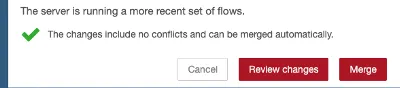
Section titled “1.2 Collaborative Editing”One of the most important things to remember when working in the Eigen Node-RED® space is that other people may be working at the same time.
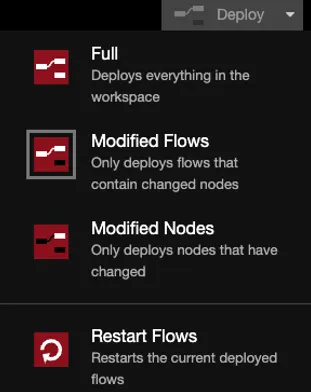
What you should do is hit review and then merge, as to not override the changes made by the other party.
1.3 Enhancing flow readability
Section titled “1.3 Enhancing flow readability”A clean, well-structured flow is easier to debug and maintain. Adhering to these tips can significantly enhance readability and functionality:
- Use consistent formatting and spacing for nodes.
- Avoid chaining too many nodes together; instead, break down complex processes into manageable steps.
- Enable ‘Snap to Grid’ in the Node-RED® editor for a neat layout.